RAG Explained in Detail: How to Make an LLM Respond Using Your Own Data
A practical explanation of RAG technology and its components—covering everything from data preparation and chunking to retrieval, reranking, prompt engineering, evaluating LLM response quality, and mitigating hallucinations.
I'd like to talk a bit about RAG in detail because it's one of the most important techniques you need to understand if you're building a system that relies on LLMs and you want it to answer from your own data, rather than just the information it was originally trained on.
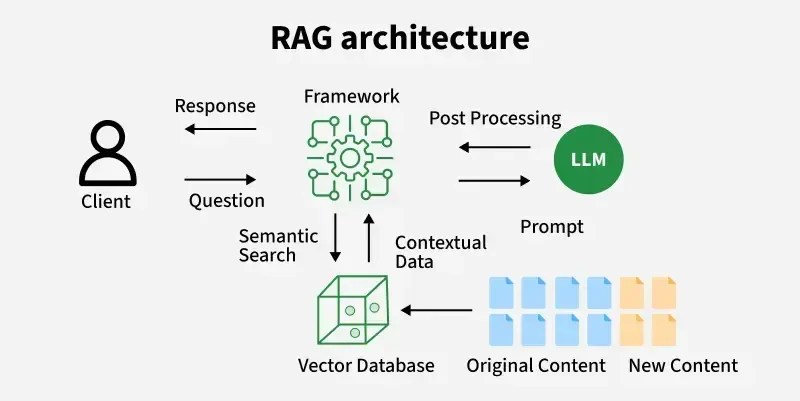
RAG stands for Retrieval-Augmented Generation. Simply put, its core idea is that before asking the LLM to answer a user's question, we first search our data sources for information relevant to that question. Then, we insert this information directly into the prompt and send it to the LLM so it can rely on it to generate the answer.
Instead of telling the LLM, "Answer me based on what's inside you," you tell it, "Search my data, fetch the important parts, and then use them while answering."
Why Do We Need RAG in the First Place?
No matter how powerful an LLM is, it has several limitations you must be aware of:
- The information it was trained on might be outdated and not up-to-date.
- It won't know the internal data of your specific company or project.
- It can confidently answer something incorrectly, which we call Hallucination.
- The information might exist within the model, but not in the specific format or detail level you require.
- Retraining the model from scratch to add new information is expensive and impractical for rapidly changing data.
- You often need to know where an answer came from so you can verify it and trust it.
RAG helps us fetch relevant information from sources we trust and place it right in front of the LLM at inference time, rather than forcing it to rely solely on its memory.
How Does RAG Work?
A RAG system is typically divided into two main phases:
- The data preparation and storage phase, known as Indexing.
- The user query handling, search, and generation phase, known as Retrieval and Generation.
Phase One: Data Preparation and Storage
Data Collection from Sources
First, you determine the data sources the LLM should rely on. These sources can include:
- PDF files
- Website pages
- Articles
- Documentation
- Notion pages
- Google Drive
- Databases
- Support tickets
- Emails
- APIs
- Word or Text files
- Past chat histories
It is crucial to understand that the quality of your entire RAG system starts with the quality of your data. If your data is incorrect, outdated, or redundant, the system will retrieve bad information no matter how powerful the LLM is.
Data Cleaning
After collecting the data, you must clean it before storing it. For example:
- Removing duplicate sections
- Stripping out unnecessary headers and footers
- Ensuring text is extracted correctly from PDFs
- Preserving headings and content hierarchy
- Removing blank pages
- Fixing issues resulting from text extraction
- Determining which version is the latest if you have multiple copies of the same file
This is genuinely one of the most underestimated stages. Afterward, people often blame the LLM or the vector database when the real issue lies in the data that was fed into the system.
Data Segmentation Using Chunking
We don't take an entire file and store it as a single piece. If a file is large and the user asks about a small piece of information inside it, we don't want to send the entire file to the LLM.
Instead, we split the content into smaller pieces, calling each piece a Chunk.
For example, if you have large documentation, you can split it based on:
- Headings
- Paragraphs
- A specific number of words or tokens
- Logical sections
- Pages
- Content type
However, chunking is not just about cutting text every 500 tokens. Doing so might slice a sentence in half or separate an explanation from its heading, causing the chunk to lose part of its meaning.
The segmentation must preserve the meaning and context of the text.
What Should the Chunk Size Be?
There is no single magic number suitable for all projects because it depends on:
- The type of data
- The length of required answers
- The nature of user queries
- The context window size
- The embedding model
- The retrieval method
- Cost and latency
A small chunk might be precise for searching, but it might lack sufficient context for the LLM to understand the information.
A large chunk might contain more context, but it can pull in irrelevant information, reduce retrieval accuracy, and consume more tokens.
Therefore, you must experiment with multiple chunk sizes and evaluate the results against real user queries.
Using Chunk Overlap
While splitting data, you can maintain a small shared portion between each chunk and the next, known as Chunk Overlap.
The idea here is that if a piece of information lies right on the boundary between two chunks, it won't get cut off and lose its meaning.
However, if you increase the overlap too much, you will store redundant data, increase costs, and potentially retrieve the exact same information multiple times in the results.
Adding Metadata
Every chunk must be accompanied by descriptive information called Metadata, such as:
- File name
- Page title
- Author name
- Publication date
- Last updated date
- Department
- Language
- Content type
- Source link
- Page number
- Access permissions
- Client or company name
Metadata is extremely vital because you can use it later for filtering.
For example, if a user asks about company policy for a specific year, you don't want to search every single file. You can specify the year and file type first, and then perform the search within those filtered results.
Converting Text to Embeddings
After splitting data into chunks, we take each chunk and send it to a model called an Embedding Model.
The embedding model transforms the text into a set of numbers representing the text's meaning, known as a Vector.
The core idea is that texts with similar meanings will often have vectors close to each other in vector space, even if they don't use the exact same words.
For example, a user might ask:
How can I return the product?
And the documentation might state:
Order refund policy
Even though the words differ, the meaning is close, and Semantic Search helps us reach the appropriate information.
Storing Embeddings in a Vector Database
After generating embeddings for each chunk, we store the vector along with the original text and metadata inside a Vector Database.
A vector database is designed to quickly search for vectors that are closest to the user's query vector.
Examples of solutions you can use include:
- Pinecone
- Weaviate
- Qdrant
- Milvus
- Chroma
- pgvector
Choosing a vector database shouldn't be your primary concern initially, because data quality, chunking, and retrieval usually have a much bigger impact than simply swapping out database providers.
Phase Two: Receiving the Question and Generating the Answer
Receiving the User's Query
When a user sends a question, it might not always be clear or complete.
The user might say:
How do I return it?
Here, the question alone lacks sufficient context, and you need to know what they are referring to from the preceding conversation.
This is why we sometimes need Query Rewriting, where the system rewrites the user's question into a clear, standalone format while preserving its intent.
For example, the question gets transformed into:
How can I return the product I ordered from the store?
Converting the Query to an Embedding
Once the question is ready, we send it to the same type of embedding model used for the data so it also gets converted into a vector.
Next, we compare the query's vector against the stored vectors and retrieve the closest chunks.
These results are called Retrieved Documents or Retrieved Chunks.
Similarity Search
The vector database attempts to determine which chunks are closest in meaning to the user's query and assigns a score to each result.
However, keep in mind that a higher score doesn't always mean the chunk actually contains the correct answer, because semantic similarity is not the exact same thing as answering a specific question.
A chunk might discuss the same topic without actually holding the required answer.
Determining the Number of Results Using Top K
Top K represents the number of chunks we retrieve from the search process.
If you set this number too low, crucial information might never reach the LLM.
If you set it too high, you might introduce a lot of irrelevant information, distract the LLM, and increase token consumption, latency, and cost.
You must experiment with the Top K value and measure whether the desired chunks actually appear in the results.
Hybrid Search
Semantic search isn't always the best approach for every type of query.
For instance, if a user is searching for:
- A product code
- An invoice number
- A function name
- An error message
- A specific technical term
Keyword-based search can be extremely important here.
Therefore, we can use Hybrid Search, which combines:
- Semantic Search using embeddings
- Keyword Search using the exact words present in the text
We then merge the results to leverage the strengths of both methods.
Using Filters Before Retrieval
We can use metadata to narrow down the search scope before performing a similarity search.
For example:
- Search only files published after a certain date
- Search only HR department documents
- Search only Arabic files
- Search only data belonging to the current client
- Search only the latest version of documentation
Filtering reduces the search space and helps us achieve more precise results, but you must ensure the filter isn't overly restrictive to the point of blocking the correct information from appearing.
Reranking
After retrieving a set of chunks, we can use another model to perform Reranking.
The retriever fetches a broader set of potentially relevant results, and then the reranker examines the question and each chunk in greater detail, reordering them based on which ones will actually help answer the prompt.
You can retrieve a larger number of results in the initial phase, and after reranking, select a smaller, optimal subset to send to the LLM.
Reranking improves accuracy, but it adds latency and cost, so you should use it when it genuinely adds value.
Building the Final Prompt
Once the appropriate chunks are retrieved, we place them inside the prompt along with the user's question and our instructions.
The final prompt typically contains:
- The LLM's persona/role
- Clear instructions for answering
- The user's question
- The context retrieved from the search
- The desired output format
- Instructions for handling missing information
- A request to cite sources if required
For example, you might tell the LLM:
Answer the user's question using only the provided context. If the answer is not clearly present, state that the available information is insufficient and do not make up an answer.
Here, you must distinguish between two important factors:
- The retrieval mechanism successfully fetching the correct information.
- The LLM correctly utilizing that information.
Even if the retriever pulls the right chunk, a weak prompt can cause the LLM to ignore it. Conversely, an excellent prompt won't save you if the retrieval failed to find the information in the first place.
Generating the Answer Using the LLM
After constructing the final prompt, we send it to the LLM to generate the response.
The answer should be built upon the provided context, not on guessed information from the model's internal parameters.
However, having RAG does not mean hallucinations disappear entirely, because:
- The retrieval might return incorrect information
- The data itself might be wrong
- The context might be contradictory
- The LLM might misunderstand the text
- The question might be ambiguous
- The prompt might lack behavior instructions for missing data
- The model might mix its internal knowledge with the context
This is why you must test the entire system, not just individual components in isolation.
Adding Sources and Citations
One of the greatest features of RAG is that you can return the sources upon which the answer was built alongside the response.
You can display to the user:
- File name
- Source link
- Page number
- Section title
- The specific text excerpt used
However, do not assume any citation outputted by the LLM is correct simply because it looks convincing.
It is best for the system to explicitly bind each chunk to its source and construct citations from the actual metadata rather than letting the LLM invent a source name or link.
How to Evaluate RAG Quality?
You cannot evaluate a RAG system by trying out two questions and deciding the result looks fine.
You must build a dataset containing real or expected questions, and for each question, define:
- What the correct answer is
- Which source contains the answer
- Which chunks are expected to appear
- When the system should say "I don't know"
- The acceptable answer format
Then, evaluate each stage independently.
Evaluating Retrieval
Here, you ask:
- Did the chunk containing the answer appear in the results?
- At what rank did it appear?
- Are the results relevant to the question?
- Were any critical chunks missed?
- Did we retrieve too many irrelevant chunks?
If the correct information isn't present in the context, the issue likely lies before generation.
Evaluating Generation
Here, you ask:
- Is the answer correct?
- Is the answer grounded in the context?
- Did the LLM invent unprovided information?
- Did it fully answer the question?
- Did it adhere to the requested output format?
- Did it state uncertainty when information was missing?
- Do the sources actually support the answer?
End-to-End Evaluation
Here, we evaluate the complete end-to-end user experience:
- Did the system understand the query?
- Did it fetch the right data?
- Was the answer clear and useful?
- Was the response time acceptable?
- Was the cost appropriate?
- Did it maintain data access permissions?
- Can it handle weird and unexpected queries?
Testing RAG Out of Distribution
Do not test your system only on easy, expected questions.
You must stress-test it with scenarios like:
- A question with no answer in the data
- A question containing false information
- An extremely ambiguous question
- A question written without punctuation
- A question with spelling errors
- A question circling around the information indirectly
- A question requiring information from multiple sources
- Sources containing conflicting information
- User attempts to override system instructions
- A question requesting data the user has no right to view
These tests will show you whether the system is truly robust or just working in a demo environment.
Common RAG Pitfalls
Bad Data
If data is outdated, incorrect, or duplicated, RAG will feed it to the LLM, and the model may build an incorrect answer on top of it.
Inappropriate Chunking
Information might be split across multiple chunks, or chunks might be too large, packing in unrelated topics.
Search Returning Similar But Incorrect Content
Semantic similarity might surface a topic close to the question without actually containing the required answer. This is where hybrid search, reranking, or query optimization becomes necessary.
Information Overload (Too Much Context)
Many people think feeding more data to the LLM yields better results, but excessive text can distract the model and cause critical information to get lost in the context.
No Handling for Missing Answers
If the system is forced to answer every time, the LLM may hallucinate an answer.
Ignoring Latency
Every added step—like query rewriting, retrieval, reranking, and generation—adds response time. You might have an accurate architecture, but if the user waits too long, they won't like the system.
Ignoring Costs
Costs span beyond just the LLM API and can include data processing, embeddings, vector storage, search queries, reranking, token volume, index updates, and monitoring/evaluation.
Ignoring Access Control
If you have data spanning multiple clients or departments, you cannot rely solely on the prompt to prevent leaks. You must enforce access control at the retrieval stage so unauthorized chunks never enter the LLM's context.
Prompt Injection in RAG
Data retrieved from storage might contain text instructing the LLM to ignore previous instructions, leak confidential information, or execute specific actions.
This means that content returned from retrieval cannot be treated as trusted instructions; it is merely data meant to be read and answered from.
You must clearly separate:
- System instructions
- User query
- Retrieved content
- Tools the model is allowed to use
Never give the LLM sensitive privileges simply because text inside the context requested it.
Updating Data in RAG
One of the great benefits of RAG is updating data without retraining the LLM from scratch.
When a file is modified, you can:
- Identify old chunks associated with it.
- Remove them or mark them as outdated.
- Split the new version.
- Generate new embeddings.
- Store them with a version number and update date.
Here, you must prevent old and new versions from coexisting without distinction, as the retriever might otherwise return conflicting information.
When to Use RAG?
RAG is suitable when:
- You need the LLM to answer from private data.
- Data changes constantly.
- You need to display answer sources.
- You have a large volume of documents.
- You need to reduce the model's reliance on memory.
- You need to manage information that cannot all fit into a prompt.
- You want to update knowledge without a new fine-tuning run.
When Is RAG NOT the Solution?
Not every problem involving an LLM requires RAG.
You might not need RAG if:
- All required information is small, static, and fits into the system prompt.
- The task relies on a specific format or style rather than information retrieval.
- You have structured data and require precise database queries; in that case, tools or SQL are more appropriate.
- The task requires executing an action via an API rather than searching documents.
- You have no reliable data sources to begin with.
- The question requires precise calculations, which are better handled by code or a calculator.
A final system can also combine RAG, tools, databases, and APIs rather than trying to solve everything with vector search alone.
RAG vs. Fine-Tuning
Many people confuse the two, but each solves a different problem.
RAG is typically used to provide an LLM with external information and sources at query time.
Fine-tuning is typically used to modify a model's behavior, style, or make it adhere better to a specific pattern.
If you have information that updates daily, it usually doesn't make sense to fine-tune daily, but you can update your RAG index.
In some cases, you can use both together:
- Fine-tuning for behavior and response style.
- RAG for updated information and sources.
Query Optimization
Sometimes a user's question isn't suitable for direct searching, so we use techniques such as:
Query Rewriting
Rewriting the question clearly while preserving its meaning.
Multi-Query Retrieval
Generating multiple formulations of the question, searching with each, and merging the results.
Query Decomposition
If a complex question has multiple parts, break it down into smaller questions and fetch information for each part individually.
HyDE
Ask the LLM to write a hypothetical answer to the question and use its vector representation to find matching documents.
However, each of these techniques adds complexity, cost, and latency, so you shouldn't use them just because they exist—always measure whether they actually improve results.
Conversation Memory with RAG
If you have a chat system, the current user query might depend on previous conversational turns.
However, do not blindly send the entire conversation history every time, as this inflates token counts and introduces irrelevant information.
You can implement:
- Conversation summarization
- Retaining the last $N$ messages
- Extracting key information
- Converting the current turn into a standalone query
- Storing specific user details with clear access permissions
You must separate conversation memory from knowledge sources, as each serves a different purpose.
Advanced RAG
As system complexity grows, you might encounter advanced RAG patterns such as:
Parent-Child Retrieval
Searching using small chunks for precision, but returning the larger parent section linked to it once a match is found to preserve context.
Contextual Retrieval
Adding a small descriptive snippet to each chunk explaining its place and meaning within the document before embedding.
Graph RAG
Leveraging relationships between entities and information to answer questions that require connecting multiple distinct parts.
Agentic RAG
Allowing the LLM to decide when, where, and how to search, and whether it needs to retry or use another tool.
However, the more complexity you add, the greater the need for monitoring, evaluation, cost control, and latency management.
How to Build a Smart RAG System?
- Start with a clear and specific use case.
- Gather real user questions.
- Clean your data and verify its accuracy.
- Experiment with multiple chunking strategies.
- Maintain metadata.
- Start with simple retrieval and measure results.
- Use hybrid search if your data characteristics require it.
- Add reranking if it proves to improve accuracy.
- Make the LLM say "I don't know" when information is insufficient.
- Link answers to real sources.
- Test edge cases, not just easy questions.
- Monitor latency and cost.
- Log queries, results, and issues.
- Version your prompts, index, and evaluation dataset.
- Apply access controls before feeding data into the LLM.
- Improve one component at a time so you know which change made a difference.
A Very Important Note
Keep in mind that RAG is not just a vector database and a prompt.
RAG is a complete system comprising a data pipeline, chunking, embeddings, retrieval, reranking, prompt engineering, generation, evaluation, security, and monitoring.
The biggest mistake is looking at an answer that looks good and assuming the system works correctly.
You must know where the answer came from, whether the source is correct, whether retrieval fetched the appropriate information, whether the LLM adhered to it, and whether the system can admit uncertainty when the information is missing.
The goal is not for the LLM to answer everything, but for it to answer reliably from available sources, and clearly state when information is absent.
Written by
Mohamed Alawakey
ML & AI Engineer documenting practical decisions from building RAG, LLM, machine-learning, and FastAPI systems.